Email has become an inseparable part of our lives, enabling us to communicate efficiently and effectively. Email is simple and ubiquitous – at work, at home, and on the go.
Smooth email communication is critical to the functioning of any business, regardless of size or industry.
For end users, “smooth email” means nothing more than hitting the “Send” button and receiving only the emails they want in their inbox.
Because we all use email every day, it can appear deceptively simple on the surface. But behind that simple act of sending lies a complex ecosystem of moving parts – email infrastructure, mail servers, email platforms, domain authentication, DNS records, compliance with various protocols, and much more.
These components are what determine whether emails actually reach recipients’ inboxes (email deliverability).
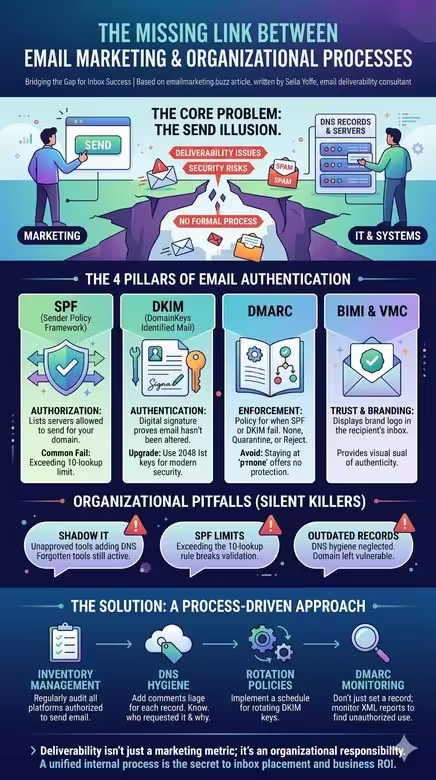
The foundation of email deliverability lies in the technical configuration of your email infrastructure. Built on top of that foundation are several pillars, including domain authentication. With the new sender requirements that came into effect in 2024, domain authentication became mandatory- it allows the receiving side (the email providers’ mail servers) to verify that the sender is authorized to send on behalf of the domain.
Domain authentication relies on two protocols- SPF (Stand for: Sender Policy Framework) and DKIM (Domain Keys Identified Mail) – and the corresponding DNS records. On top of those two protocols sits DMARC (Domain-based Message Authentication, Reporting & Conformance), catchy, huh?, designed to protect domains and brands from spoofing and phishing attempts.
One more protocol that depends on all three of the above is BIMI (Brand Indicators for Message Identification) – the brand logo that functions as a modern wax seal. It typically comes paired with a VMC certificate (which requires a registered trademark on the logo and provides recipients with visual proof of the logo’s and sending domain’s authenticity), or with the newer CMC certificate (which doesn’t require trademark registration but still provides visual logo authentication). Note: Gmail will not display a blue checkmark for CMC certificates.
The right platform challenge
Organizations typically make three key mistakes when choosing an email platform. First, they rely on analyst reports that lump together vendors of very different sizes and capabilities, then cherry-pick the top-ranked ones, which may not fit their actual needs. Second, they trust vendor salespeople who claim their platform can do everything, making it nearly impossible to distinguish real differences. Third, they turn to peers on discussion boards, asking “Who do you like?” and end up selecting a platform that was perfect for someone else’s company, not their own. The core problem is that brands are bombarded with information that paints an incomplete picture of the landscape relative to what they actually need. I’ve seen many cases of enterprises marrying the wrong email platform.

A podcast featuring the leading email marketing and email deliverability experts and email geeks. I am Sella Yoffe, an email deliverability consultant from Israel. I work with global email senders, startups, and email service providers to improve their email deliverability and strategy. Join us in this podcast, where top email marketing and deliverability professionals share their tips and advice. — Opening music from #Uppbeat (free for Creators!): https://uppbeat.io/t/reakt-music/deep-stone. License code: TPPQ0BDS5ZP1NWZL
Chris Marriott delves into the challenges brands face in selecting the right email marketing vendor, emphasizing the importance of understanding specific needs and complexities in choosing the right platform.
We discuss the process of email platform migration, highlighting the need for guidance and considerations involved in ESP migration. The speakers also touch on the importance of marketing automation and multichannel capabilities in modern ESPs and the challenges organizations face in finding the right email platform. Integration partners are emphasized for ecommerce businesses selecting an ESP, with advice on negotiating transparent pricing and avoiding complex structures. The discussion also covers the integration of CDPs within ESPs, the evolving landscape of ESPs and CDPs, and insights on navigating the ESP selection process.

The Organization That Doesn’t Learn
Despite how critical email is to organizations, a real problem persists in every organization that lacks internal procedures for managing email infrastructure. For example, when the marketing department starts using a new ESP )email marketing platform), marketing automation platform, or a CRM, they simply notify IT about the DNS records that need to be updated.
There are typically no procedures within IT departments to periodically validate that information- to verify it’s still relevant and that those DNS records are still needed.
Any infrastructure configured in your domain’s DNS that is no longer relevant to the organization opens a security gap: you’re granting sending permissions on behalf of your domain to systems that no longer serve your organization.
The DNS Challenge – Divide and Conquer
DNS is a critical component for every business. For many organizations, the domain registrar manages their DNS- meaning management stays with the registrar, whether that’s GoDaddy, Namecheap, or another.
It’s recommended to manage DNS separately for security and redundancy purposes. To do this, the domain owner can configure the Name Server (NS) records at the registrar and point DNS management to an external service.
Despite two partial outages recently, Cloudflare still offers a secure, well-propagated DNS with over 12,500 nodes worldwide- and it’s fast and free. It also has a useful feature that helps IT teams bring order to DNS chaos: you can add a comment to every DNS record explaining its purpose and who in the organization requested it, and you can even tag records by system or department.
The SPF Challenge
Even experienced IT professionals in organizations sometimes make mistakes, such as adding multiple SPF records for the same domain (only one is allowed) or leaving outdated SPF records in DNS (some DNS environments still contain the old SPF record type, which is no longer valid; a proper SPF record is type TXT or CNAME, depending on the sending platform’s configuration).
Another concern: SPF authentication can fail for certain email platforms if IT isn’t actively monitoring DNS records and their relevance. This can happen when an SPF record exceeds the maximum allowed limit of 10 DNS lookups, causing some email platforms to fail SPF authentication. There are solutions to the DNS lookup problem, but if left unaddressed, it can cause deliverability issues.
On top of that, granting sending permissions to platforms that are no longer in use carries a real security risk and places liability on the organization.
The DKIM Challenge
Another example involves DKIM records (an additional domain authentication protocol). Some organizations implemented DKIM years ago with a 1024-bit key size (or even 512-bit). Today, from a security standpoint, a 2048-bit key is the recommended standard.
Another security consideration: DKIM keys should be rotated periodically. But it’s often unclear who is responsible for that rotation. Is it handled by the ESP or by the organization itself?
Many organizations overlook these significant issues and aren’t aware that they can become serious deliverability or information security problems over time, especially as the organization accumulates more email platforms (or other systems that send email on behalf of the organizational domain).
The DMARC Challenge
Before the “new sender requirements” introduced by major email providers took effect in 2024, it was possible to send properly authenticated emails without a DMARC record. One of the few genuinely new elements in these guidelines was the requirement to make DMARC mandatory.
If you look at the typical “recommended” DMARC record, almost every ESP recommends this: v=DMARC1; p=none. That record is essentially useless because it doesn’t include an email address for receiving DMARC reports (no rua tag). And even when there is an email address in the DMARC record, it’s often an internal mailbox that nobody actually checks. Even if someone does check it occasionally, these are XML-format reports that are nearly impossible to read without a DMARC monitoring tool. It’s like watching a single frame from a movie.
The whole point of DMARC is to protect your brand and domain. To do that, organizations need to go through the “DMARC journey” – from p=none, through p=quarantine, to (ideally) p=reject.
DMARC reports serve as a discovery mechanism that exposes every platform sending email on behalf of your domain. This surfaces infrastructure that nobody in the organization remembers exists, yet it’s still sending mail in the organization’s name, like old dev servers or legacy systems. Some of these can simply be decommissioned (DNS records removed), while others require fixing authentication and alignment mechanisms.
I sometimes encounter DMARC records set to reject with no reporting address (no rua), which makes it immediately clear that nobody actually went through the DMARC journey. That’s a classic case of shooting yourself in the foot.
Deliverability problems frequently emerge in these organizations because the sending infrastructure wasn’t properly configured. On top of that, receiving servers (email providers) are instructed to quarantine or reject emails from the organizational domain whenever there’s an authentication or alignment failure (depending on the policy).
DMARC reports can sometimes surface fascinating insights. For example, an ecommerce brand sending around 60 million emails per month – a brand that could be sending from multiple dedicated IP addresses, but whose DMARC reports reveal they’re using a shared IP pool provided by their ESP.
This client is already achieving strong results, but at that volume, even a marginal improvement in email performance can translate directly into a significantly more profitable bottom line.
The Domain Architecture Challenge – Subdomain vs. Cousin Domain
When an organization’s primary domain gets blocked – and the entire company, including customer service reps, can’t send a single email – the knee-jerk reaction is predictable: move marketing to a completely separate domain. It sounds logical. Isolate the risk. Start fresh. But this decision, usually made under pressure, often makes things worse.
A cousin domain (also called a synonym domain) – a domain name that closely resembles the brand’s primary domain but isn’t the same – may raise a red flag with email providers. They aren’t naive: a brand-new domain that looks suspiciously similar to a known brand triggers phishing heuristics rather than trust signals. And even when emails do get through, recipients see an unfamiliar sender address that doesn’t match the brand they know. The result: confusion, lower engagement, and – ironically – higher spam complaints. The exact opposite of the intended outcome.
There’s another cost that’s easy to overlook: BIMI. A cousin domain might not get approved for the brand’s verified logo in the inbox. That means giving up one of the most powerful visual trust signals available to senders today – the logo and blue checkmark that BIMI with a VMC certificate provides.
The recommended practice for separating domain reputation is to use dedicated subdomains under the primary domain for each email stream. Examples: marketing.brand.com, transactional.brand.com, operational.brand.com – with proper segregation of IP addresses across email streams. Major brands don’t send from cousin domains. They send from subdomains. A subdomain inherits a portion of the parent domain’s established reputation rather than starting from zero, while still keeping each email stream’s reputation isolated.
But here’s the critical point: subdomains alone won’t save you without proper procedures. In the real-world case that prompted this discussion, a large organization had subdomains in place – yet its primary domain was still blocked. The root causes were the same organizational process failures discussed throughout this article: no IP segregation across email streams, no control over send volumes, no proper segmentation, no throttling, no DMARC monitoring, and no internal procedures governing email platforms and approval workflows. That’s a failure that would have damaged any architecture – cousin domain included.
The domain architecture decision is, ultimately, not just a technical one. It’s strategic and organizational. And it only works when backed by the processes and monitoring infrastructure described in this article.
While robust email authentication and proper infrastructure management are crucial for deliverability, they are foundational to building your email program. Deliverability requires more than the technical base. It is where your email program truly begins.

Email Deliverability Consultant | Blogger & Podcaster. Helping global email senders, startups, email and digital agencies, and ESPs with email deliverability, email authentication, and strategy.