Why Is DMARC Important?
One of the mandatory requirements introduced by major mailbox providers in 2024 for bulk senders was to set a DMARC record.
I have launched an independent research project to examine DNS records and technologies used by domains registered by businesses in my country. As a first step, I evaluated the DMARC status of the 1,000 most popular websites, and the findings are surprising. See below.
Let’s review the common DMARC mistakes, but first, what is DMARC?
What is DMARC?
DMARC stands for Domain-based Message Authentication, Reporting & Conformance. It’s an email security protocol designed to protect domains and brands. It allows domain owners to set policies instructing receiving mailbox providers (such as Gmail and Yahoo) on how to handle email messages that fail SPF and DKIM authentication. Domain owners can also receive reports on authentication (SPF and DKIM) and alignment status for their sending domain.
As a deliverability professional, DMARC reports provide me with invaluable insights into auditing email activity across organizations and taking appropriate action.
Although initially viewed as a light cybersecurity tool, DMARC has become an additional layer of protection, “riding above” DKIM and SPF, providing context between the two protocols for each sending source. Proper DMARC implementation enables organizations to complete their “DMARC journey” to enforcement, resulting in gaining some “deliverability points” in the grand deliverability game. Conversely, misconfiguration can harm the sender.
Major email providers (Gmail, Yahoo, and now Microsoft) have mandated DMARC for bulk senders, requiring at least a p=none policy (monitoring-only) for any domain used to send email.
Still, many organizations neglect DMARC or implement it incorrectly. Not just small businesses but even banks, insurers, and large enterprises. This leaves dangerous gaps that can be exploited for impersonation and puts their customers at risk.
The Most Common DMARC Mistakes I See, and How to Avoid Them
Mistake I: Not Publishing a DMARC Record
The most common and easiest-to-fix mistake is simply not publishing a DMARC record at all. Today, there is a wide range of tools for every need and budget, from free (Cloudflare) to paid (EasyDMARC, Dmarcian, Uriports, and others- see a list of tools at DMARC.ORG site), allowing anyone to set up and monitor DMARC. My blog’s homepage includes a recommended list of DMARC tools.
Mistake II: Publishing an Incorrect or Useless DMARC Record
Another frequent mistake is implementing DMARC incorrectly, either with a typo or by using a DMARC record that adds no real value (a useless record). For example:
Using a minimal DMARC record without an RUA tag (reporting address) renders it essentially ineffective. For example, v=DMARC1; p=none, with no additional parameters. Many ESPs will request you to implement this exact DMARC record.
Even “better,” I sometimes see a DMARC record such as v=DMARC1; p=reject with no reporting address and no additional settings, which may harm deliverability by not providing feedback or real-time error detection and even cause legitimate emails to be rejected (as asked by that DMARC policy).
Another common issue is configuring the policy in an unsupported language (e.g., translating “none,” “quarantine,” or “reject” into another language) or simple typos, both of which cause the policy to be invalid.
Mistake III: Publishing More Than One DMARC Record
Only one DMARC record per domain is allowed. While DMARC permits separate policies for subdomains using the sp tag, there should never be more than one record for a single domain. In some cases, an organization might need a separate DMARC record for a particular subdomain, but there should always be just a single record per (sub)domain.
Mistake IV: Leaving DMARC Policy at p=none Permanently
While it’s best to start the DMARC journey with a p=none (monitor only) policy, many organizations never progress from this stage. This is often based on the misconception that simply having a DMARC record is “enough,” without realizing that DMARC is not a “set and forget”.
Ongoing maintenance is required: monitor and analyze reports and fix any authentication issues. The p=none policy does not improve deliverability or security. It is meant for observation and data collection. Failing to transition over time to a stricter policy (p=quarantine, then p=reject) leaves the domain vulnerable.
Mistake V: Implementing DMARC Only on a Subdomain Instead of the Main Domain
Some organizations implement DMARC only on a subdomain used for marketing, but disregard the primary domain. This leaves the main domain unprotected and prone to spoofing attacks. The main goal of DMARC is to protect your brand’s primary domain and all its subdomains. The absence of a DMARC record on the main domain may be interpreted by email providers as neglect. Set the DMARC policy on the main domain, and use the sp tag for subdomain-specific policies. If needed, implement a policy also for sub-domains.
Mistake VI: Misunderstanding the Alignment Mechanism
For DMARC to pass, the sending domain’s SPF or DKIM must align with the domain in the From (RFC5322). There is currently no requirement for SPF alignment, and many email platforms don’t support strict SPF alignment. Incorrectly configuring alignment tags can cause DMARC failures and, depending on the policy, result in emails being quarantined or rejected.
- Alignment is determined by the aspf and adkim tags.
- Relaxed (default) alignment is generally sufficient; strict alignment requires an exact match and is recommended in some cases, particularly for DKIM.
- Be attentive to alignment settings when using subdomains for sending.
Mistake VII: Not Protecting Parked Domains
It’s common to implement DMARC only on actively sending email domains and ignore others owned by the organization. Best practice: Protect all your domains, even those not used for sending emails. For parked (unused) domains, publish an SPF record (v=spf1 -all) and a DMARC record with a strict enforcement policy (p=reject or p=quarantine) to block unauthorized usage.
Professional DMARC monitoring tools often allow organizations to include parked domains for monitoring at no additional cost.
Mistake VIII: Not Setting Up Alerts
DMARC monitoring platforms can set up alerts for any changes in DMARC policy or DMARC authentication failures. This can save organizations from trouble if someone accidentally alters DNS records. For example, I once helped a large client avoid blacklisting after a DNS migration had broken DKIM records. Had they set up DMARC alerts, they would have detected the issue much sooner and potentially minimized the damage.
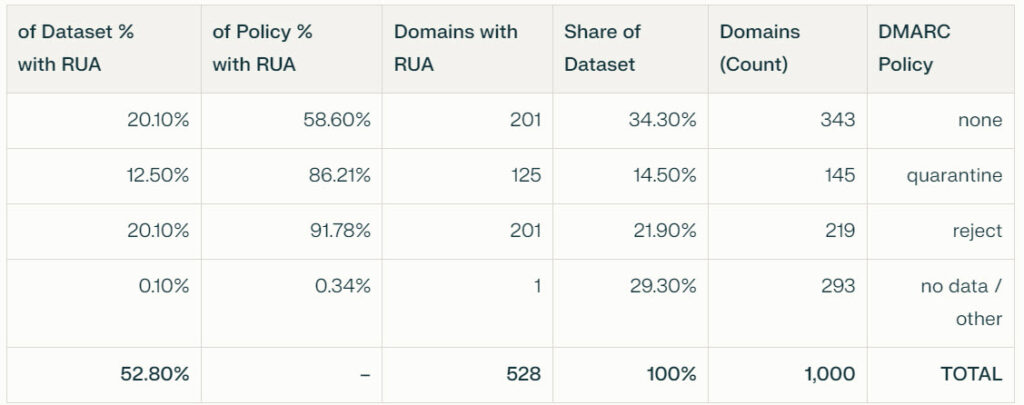
My Research Findings on the 1,000 Most Popular Domains. I’m reviewing DMARC adoption reports from DMARC reporting tools and have concluded that DMARC is often overlooked. I am doing my own research now and have started by analyzing the top 1000 most popular domains in my country.
29.3% do not publish any DMARC record!
Only 21.9% enforce DMARC with p=reject, 14.6% enforce it with p=quarantine, and 34.3% are still at p=none.
RUA Reporting Gaps:
Only 52.8% of domains include an RUA reporting address. Nearly all domains with reject or quarantine enforce reporting, but more than 40% of domains using none do not report (i.e., have ‘useless’ records).
Enforcement-Reporting Ratios:
Reject: 91.78% include RUA
Quarantine: 86.3%
None: just under 60% include RUA
Note: Not all of these 1,000 domains are sending emails, and some use different sending domains. In some cases, sending occurs through a subdomain that may have its own separate DMARC record.
As my research progresses, I will share updated insights and additional data.

Email Deliverability Consultant | Blogger & Podcaster. Helping global email senders, startups, email and digital agencies, and ESPs with email deliverability, email authentication, and strategy.
- Sella Yoffe
- Sella Yoffe